 OwnPDF
Redact a PDF for good, without uploading it
For anyone sending a PDF with names, account numbers or SSNs in it. A black box drawn on top of text doesn’t hide it: copy-paste and AI tools read right through. OwnPDF deletes what’s under the box, removes hidden data, and checks the file before you download it. Your document never leaves your computer.
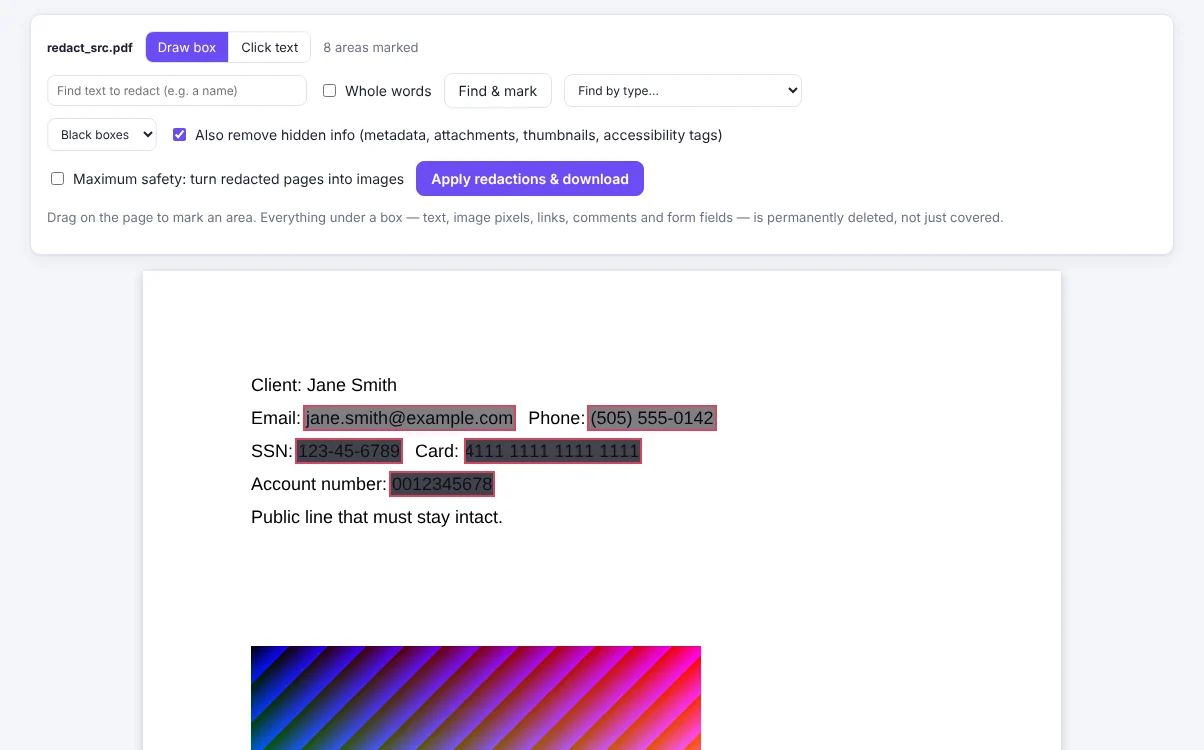
How to redact a PDF with OwnPDF
Mark what to remove
Drag boxes, click text, or find every email, phone number, SSN, card or account number in one click.
Apply
Text, pictures, links and form fields under each box are removed for good.
Download the checked copy
OwnPDF reads the new file again to make sure nothing is left under any box.
Questions
Is the redacted text really gone?
Yes. The characters are deleted from the page content, and copies in metadata, bookmarks and form fields are scrubbed too.
Can I redact images?
Yes — the pixels under the box are erased from the image itself.
Does my file get uploaded?
Never. Redaction runs on your computer.
Pay once and keep it.
Start with the free tools. Unlock everything for $19.99, one time.
More guides