 OwnPDF
A PDF editor for Chrome, Edge and Brave — that works offline
For anyone who opens PDFs in Chrome and needs to change them. OwnPDF is a full PDF editor inside your browser. Right-click a PDF link to open it, or drop in a file. Editing, signing and converting all happen on your computer, even with no internet.
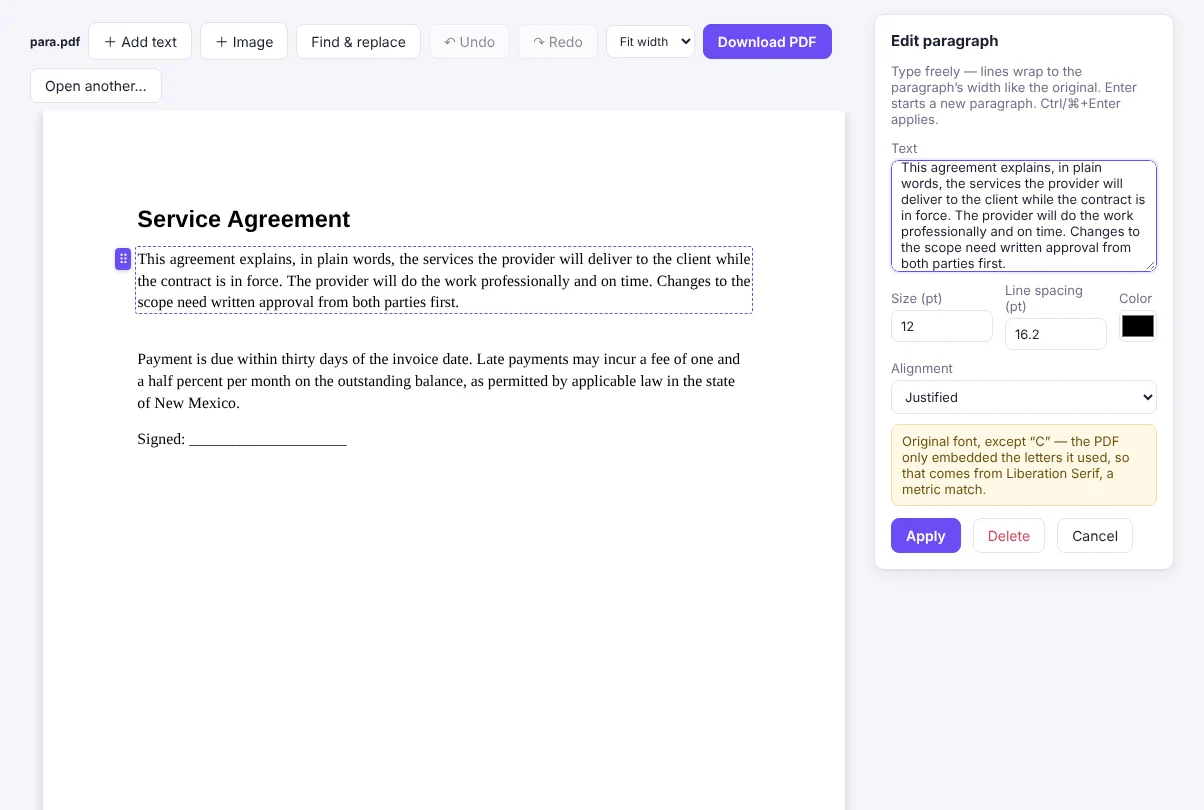
How to edit PDFs in Chrome with OwnPDF
Add OwnPDF
From the Chrome Web Store — Edge and Brave install it from there too.
Open a PDF
Click the toolbar icon, drop a file, or right-click a PDF link → “Edit this PDF in OwnPDF”.
Pick a tool
Merge, split, organize, lossless compression and images to PDF are free. Everything else comes with the lifetime license.
Questions
Does it need special permissions?
Only right-click menus and local storage. To open a PDF from a website it asks for that one site, at that moment.
Does it work offline?
Yes. Every tool runs on your computer, even OCR and passwords.
Which browsers?
Chrome, Edge and Brave on Windows, Mac and Linux, and Chrome on a Chromebook.
Pay once and keep it.
Start with the free tools. Unlock everything for $19.99, one time.
More guides