 OwnPDF
Edit text in a PDF — in the original font
For anyone who needs to fix a word, a number or a whole paragraph in a PDF. Most PDF editors paste a white box over the text and type on top. OwnPDF edits the real text in the PDF’s own font, size and color, and deletes the old words from the file.
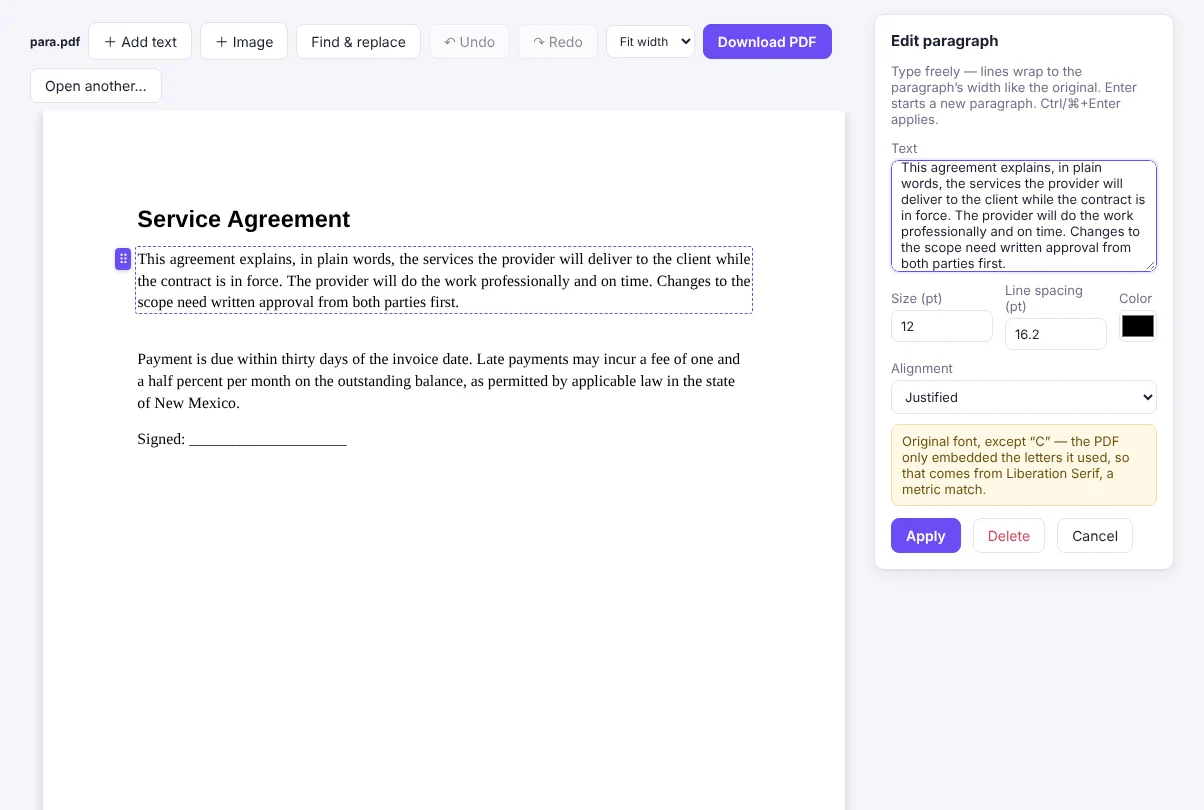
How to edit text in a PDF with OwnPDF
Open the PDF in OwnPDF
Drop it on the page, or right-click any PDF link → “Edit this PDF in OwnPDF”.
Click the text and type
The field uses the PDF’s own font. For a longer change, choose “Edit the whole paragraph” and it re-wraps like the original.
Download
The old text is removed, not hidden — copy and search find only the new words.
Questions
What if the font is missing a letter?
PDFs often embed only the letters they use. OwnPDF fills any missing letter from a metric-matched font and tells you which letters were affected.
Can I edit scanned PDFs?
Yes — OwnPDF recognizes the text first (OCR, English), then you can edit the lines.
Does it work offline?
Yes. Nothing is uploaded.
Pay once and keep it.
Start with the free tools. Unlock everything for $19.99, one time.
More guides