 OwnPDF
It’s just a PDF. Stop renting the software to edit it.
OwnPDF edits the real text in your PDFs — in the original font — and signs, redacts, merges, compresses and converts them, right in your browser. Pay once and it’s yours for good.
Works in Chrome, Edge & Brave · Try every tool on your own file · Pay once, only when you save
We got fed up. You probably are too.
Changing one line in a PDF shouldn’t mean another monthly bill, a cancellation maze, or handing your bank statement to somebody else’s server.
The “monthly” plan that’s really a year
Adobe’s most popular plan is “annual, paid monthly”. In 2024 the FTC and DOJ sued Adobe, alleging it hid an early-termination fee of 50% of the remaining payments.1 Adobe settled in 2025 for $75 million plus $75 million in free services, while denying wrongdoing.2
$240 a year to edit a PDF
Acrobat Pro is $19.99 a month on an annual plan — $239.88 every year, for as long as you need it.3 Even the “cheap” online tools want $7–15 a month.4,5
Your files, on their servers
Online PDF sites work by uploading your document — contracts, IDs, payslips, bank statements — to process it remotely. OwnPDF never uploads anything. It all happens on your computer.
So we built the PDF editor we actually wanted: pay once, own it, keep your files to yourself.
Everything you actually do with PDFs
Not a viewer with a pen tool. Real editing — and the boring jobs, done properly.
Edit the real text
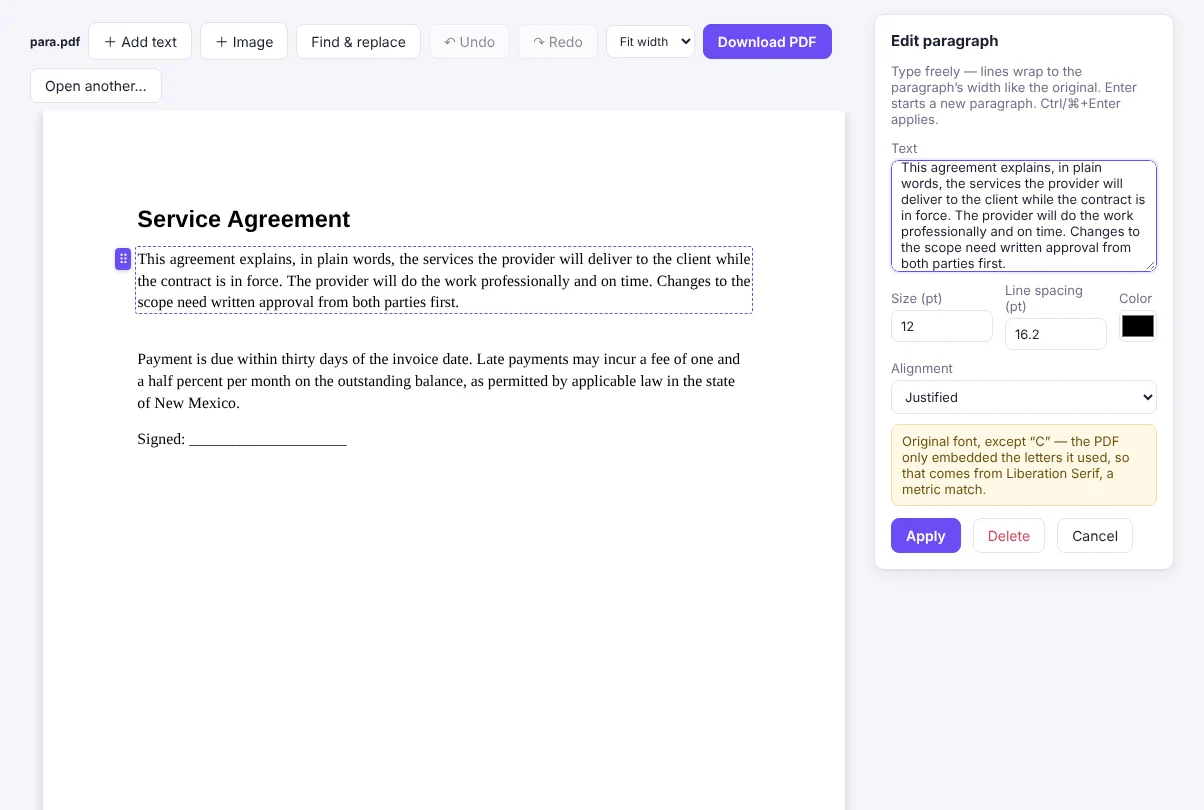
Click any line and type. OwnPDF reuses the PDF’s own embedded font, size and colour — and deletes the old words instead of covering them.
Re-flow whole paragraphs
Rewrite a paragraph and it wraps to the original width, line spacing and alignment — justified text included.
Fill any form in one click
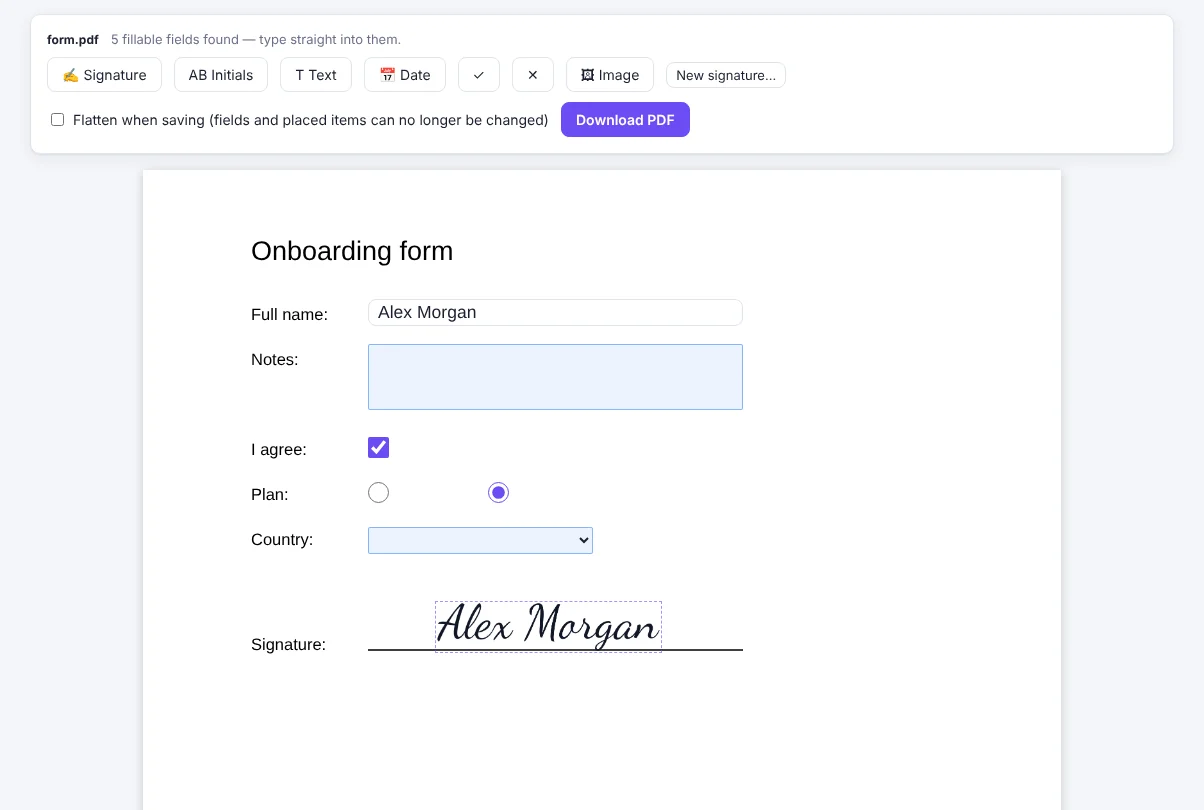
Even forms with no fillable fields, and scans: OwnPDF finds the blanks. Save your details once and it fills your name, email, address and date for you. Then sign.
Redaction that’s real
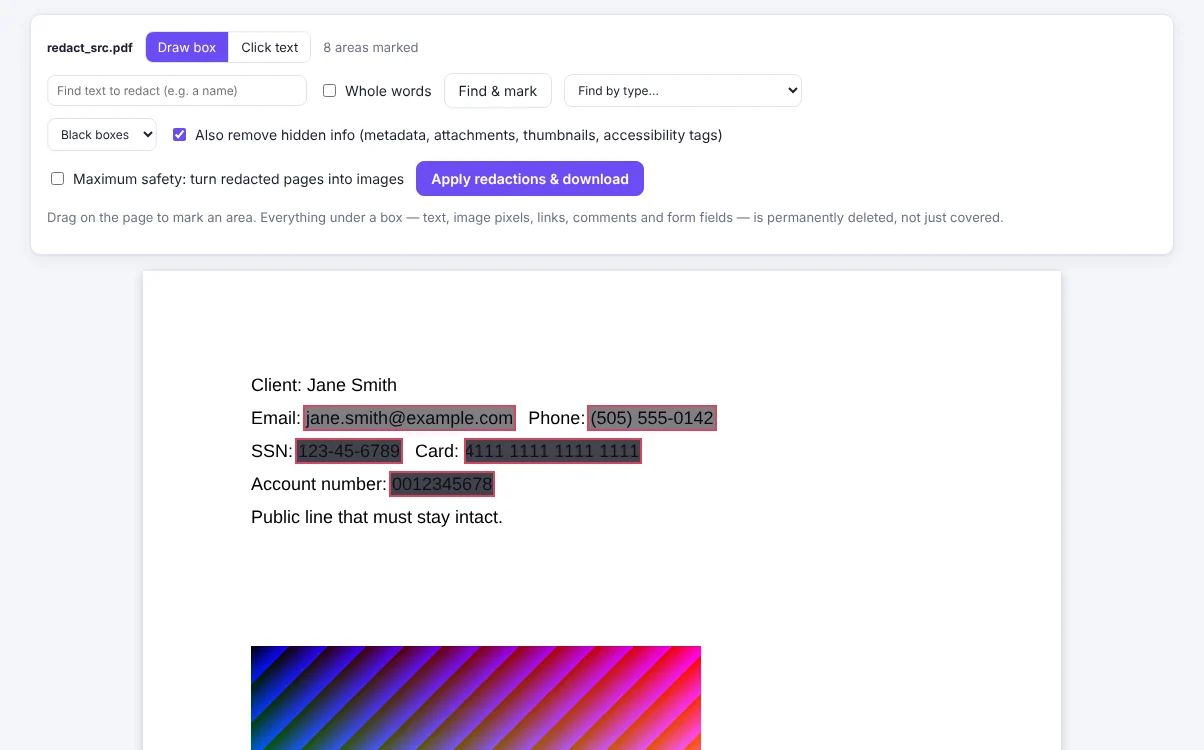
Text under the black box is removed from the file — not hidden — along with hidden metadata. Checked again before you download.
Compare two versions
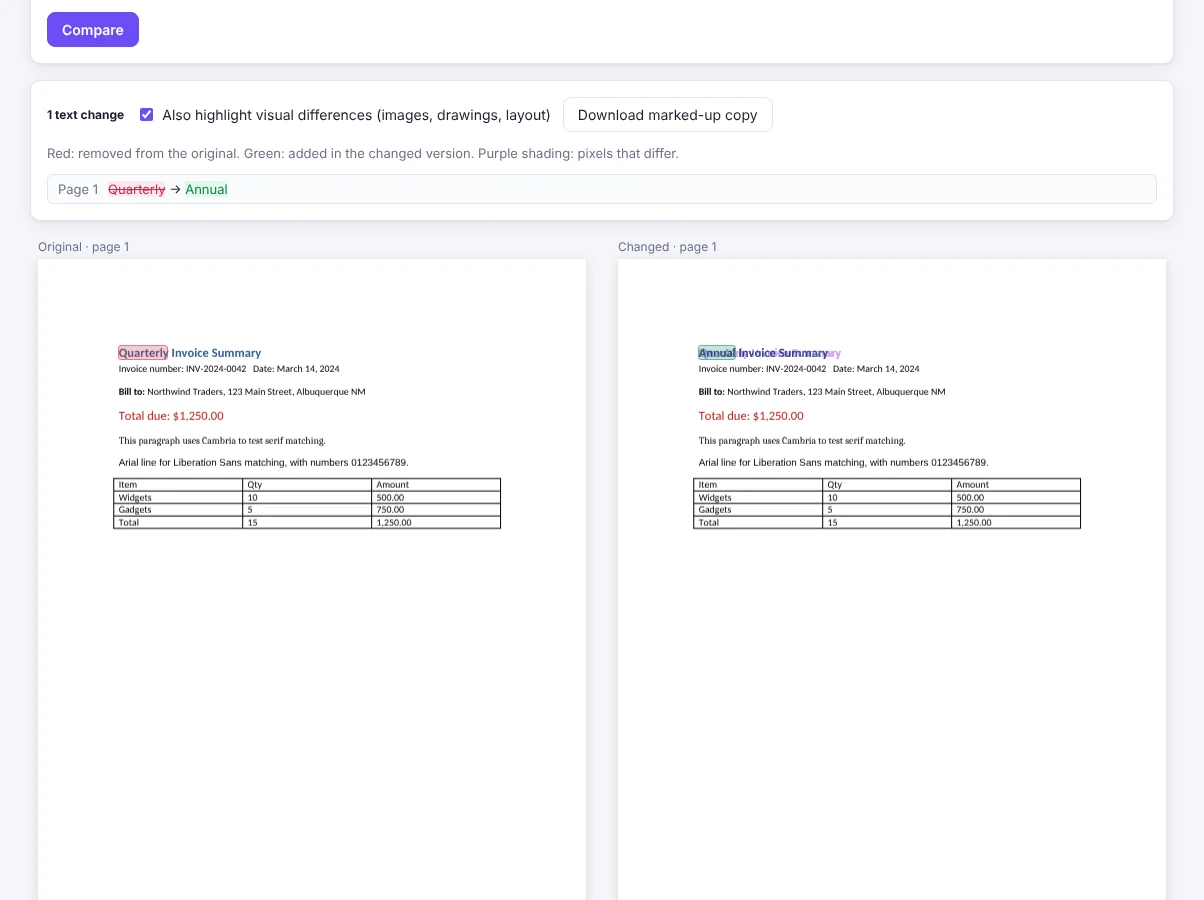
See every added, removed and changed word side by side, plus visual changes. Export the differences as comments.
Merge, split, organize
Combine files, reorder, rotate, extract or delete pages. Bookmarks, links and form fields come along.
Compress without wrecking it
Lossless clean-up that changes nothing you can see, or stronger image compression when size matters.
Convert both ways
PDF to Word, Excel, PowerPoint and images. Word, Excel, PowerPoint, web pages, e-books and images to PDF.
Protect, stamp, batch
AES-256 passwords, watermarks, page numbers, Bates numbering, crop and resize — on one file or a hundred. Plus OCR: scans become searchable, copyable — even editable — text.
Your files never leave your computer.
Most PDF services ask you to trust their privacy policy. OwnPDF doesn’t need you to: there is no server that ever sees your documents.
- Everything runs locallyEvery edit, conversion and compression happens inside your browser. Nothing is uploaded — check your browser’s network panel if you like.
- Free or paid, the same privacyThe free tools run exactly like the paid ones: on your computer, with nothing uploaded and no account. Free never means “we look at your files”.
- Works offlineOnce installed, it keeps working on a plane or with the Wi-Fi off.
- No accountNo sign-up, no password to leak, no subscription to cancel.
- Activate once, then it’s offlineEach computer is activated once, then your license is checked on that computer with a cryptographic signature. No phoning home after that — it keeps working even if our website is gone.
- Real redaction and AES-256Redacted text is deleted from the file, and password protection uses AES-256 encryption.
Up and running in a minute
Add it to your browser
Install OwnPDF from the Chrome Web Store or Edge Add-ons. Free, no sign-up.
Try any tool on your file
Merge, split, organize and compress for free. Every other tool works too: edit, sign or redact your real PDF and see the result before you pay.
Pay once to save it
When you save a Pro result, buy the lifetime license. OwnPDF unlocks itself and your file saves right away. Your key is also emailed to you.
How OwnPDF compares
Same everyday jobs. Very different deal.
| OwnPDF | Adobe Acrobat Pro | Smallpdf Pro | iLovePDF Premium | |
|---|---|---|---|---|
| What you pay | $19.99 once | $19.99/month on an annual plan ($239.88/year)3 | $9–15/month4 | $7/month or $48/year5 |
| Subscription | No — yours for good | Yes | Yes | Yes |
| Leaving early | Nothing to cancel | Early-termination fee on the annual plan if cancelled in the first year1 | Cancel the subscription | Cancel the subscription |
| Account needed | No | Yes (Adobe account) | Yes | Yes |
| Where your files go | Stay on your computer | Desktop app: your computer · online tools: Adobe’s servers | Web app uploads them to Smallpdf’s servers | Web app uploads them to iLovePDF’s servers |
Prices are the publishers’ US list prices, checked November 2026, and may change — see their pricing pages. OwnPDF is not affiliated with Adobe, Smallpdf or iLovePDF; their names are trademarks of their owners and are used only to compare.
One price. Once.
Start free. When you need more, buy it once and it’s yours — including updates.
Free
- Private: your files never leave your computer
- Merge & split PDFs
- Rotate, delete, extract & reorder pages
- Images → PDF and PDF → images
- Lossless compression
Lifetime license
- Everything in Free, plus:
- Edit text & whole paragraphs in the original font
- Fill any form in one click, sign & annotate
- Real redaction
- Compare, batch, protect & unlock
- Page numbers, Bates, watermarks, crop & resize
- PDF ↔ Word, Excel & PowerPoint · HTML & EPUB → PDF
- OCR: make scans searchable and editable
- Strong compression
- Use on up to 2 of your computers
Questions
Is it really a one-time payment?
Yes. You pay $19.99 once. There are no renewals, no automatic billing and nothing to cancel. The license is yours, on 2 computers, including updates.
Do you upload my files?
No. OwnPDF runs entirely in your browser on your computer — there is no server that receives your documents. It even works offline. You can confirm it in your browser’s developer tools (Network tab): opening and editing a PDF sends nothing.
Is the free version private too?
Yes. Free and paid tools work the same way, in the extension and in the free tools on this website: everything happens inside your browser, on your computer. Nothing is uploaded and you don’t need an account. Our server only sends you the program. It never receives a PDF.
How does activation work?
After checkout, the thank-you page unlocks the extension automatically if it’s installed in that browser — no key to type. We also email your key so you can unlock it later, on another computer, or after reinstalling.
How many computers can I use it on?
Two of your own computers. Each one is activated once (it takes a second and needs the internet that one time). Install OwnPDF on the second one and paste the key from your email (Go lifetime → Have a key?). Replacing a computer? Remove the license on the old one, or use the “Reset your computers” link in your license email.
Which browsers does it work in?
Chrome, Microsoft Edge and Brave (and other Chromium-based browsers) on Windows, Mac, Linux and ChromeOS. Firefox and Safari aren’t supported yet.
What can I do for free?
Merge, split, rotate, delete, extract and reorder pages, convert images to PDF and PDF to images, and compress losslessly — with no limits and no watermark.
Can I get a refund?
All sales are final. That’s why you can try every tool first: open your own PDF in any Pro tool, do the work, and see the result. You only pay when you save it. If something isn’t working, email us and we’ll help.
Can I try the paid tools before I buy?
Yes. Every tool opens and works for free, on your own files. When you save the result of a Pro tool, OwnPDF asks you to unlock it. Pay, and the file saves right away in the same tab.
Will it keep working if OwnPDF disappears?
Yes. The extension runs on your computer and an activated license is checked offline, so computers you’ve activated keep working with nothing depending on our servers.
Can it edit scanned PDFs?
Yes, with the lifetime license. OwnPDF recognizes the text on a scanned page (English, on your computer — nothing is uploaded), makes it searchable and copyable, and lets you edit lines: the old words are painted over with the paper colour and the new ones drawn in the closest matching font. On PDFs with real text, edits reuse the original font exactly.
Is it as powerful as Acrobat?
Acrobat does more — multi-language OCR, print production and enterprise features, for example. OwnPDF covers the everyday jobs most people pay for Acrobat to do — edit, sign, redact, merge, compress, convert, protect — for a single payment.
Guides
How to do the most common PDF jobs — privately, in your browser.
Edit text in a PDF →
Click any line and type, in the document’s own font. Paragraphs re-flow.
Redact a PDF permanently →
Remove names, SSNs and card numbers for real, not just cover them.
Sign a PDF without uploading →
Fill forms and add your signature, initials and date, offline.
Merge PDF files, free →
Combine PDFs and images into one file. Free forever, no uploads.
Compress without losing quality →
Lossless compression that changes nothing you can see. Free.
A PDF editor with no subscription →
Pay $19.99 once and own it. What you get, and what it replaces.
Switching from Acrobat →
The same everyday jobs for $19.99 once, instead of $239.88 a year.
Switching from Smallpdf →
The tools you use, without uploading your files or a monthly plan.
Switching from iLovePDF →
Every tool runs offline on your computer. Pay once.
Lost your license key?
Enter the email you bought with and we’ll send it again.
Own your PDF editor.
Free to start. $19.99 once to unlock everything. No subscription, ever.